Switched On Reporting
Valuation report automation. Not valuation-by-algorithm.
For valuation firms that use Word or Excel and repeat manual data entry.
Reduce errors
Rebrand or update clauses fast
Speed up valuation turnaround times
Streamlines the way you work
Basic Automation Package Key Benefits

Video can’t be displayed
Video heavily edited. See https://www.youtube.com/watch?v=nGL4wEsXvqo for higher quality video.
For the full video demo at standard speed, see https://www.youtube.com/watch?v=ZwBI5zchvwc
Already have an internal job database system? Custom consulting is available to further automate your system.
One job entry. Three documents produced automatically.
Made on your Word templates
Easy rebranding
Report consistency
Copying and pasting between your Valuation analysis spreadsheet and the Valuation Report?
Copying and pasting takes a lot of time and is human error prone.
Or you could use an Excel to Word tool.
Once configured, point your Word document to your updated valuation analysis Excel sheet, click the right buttons and it updates for you. Fast and without manual copy paste errors.
The same can be done for complex retainer agreements / letters of engagement.
See the example videos below.
Excel to Word Valuation Report Automation (implementation service)

Video can’t be displayed
For higher quality video, see https://youtu.be/qidCpVL1G1A
Switched On Reporting is not associated with any Excel to Word automation vendor, including the ones shown in the video.
If you decide on an Excel to Word automation tool that meets your requirements and purchase appropriate licencing from the software vendor, Switched On Reporting can help you implement it.
Consulting to step you through the process can also be provided.
Excel to Word Conditional Content Automation (implementation service)

Video can’t be displayed
For higher quality video, see https://youtu.be/i49OqXGo-og
Switched On Reporting is not associated with any Excel to Word automation vendor, including the ones shown in the video. If you decide on an Excel to Word automation tool that meets your requirements and purchase appropriate licencing from the software vendor, Switched On Reporting can help you implement it.Consulting to step you through the process can also be provided.
Business hours: Melbourne, Australia (AEST) — or leave me a voicemail
Remote implementation available.
Arrow right to see the Basic Automation Package in action!
Step 1: Instruction letter received
Step 2: Input details once
Step 3: Documents generate in less than a minute
Auto- generated folder . . .
. . . with details propagated
Auto-generated Valuation Report, Retainer and Invoice . . .
. . . with details propagated
The auto- generated docs are from your current branded templates
Retainer and Invoice according to your current branded templates
All documents now have details propagated throughout
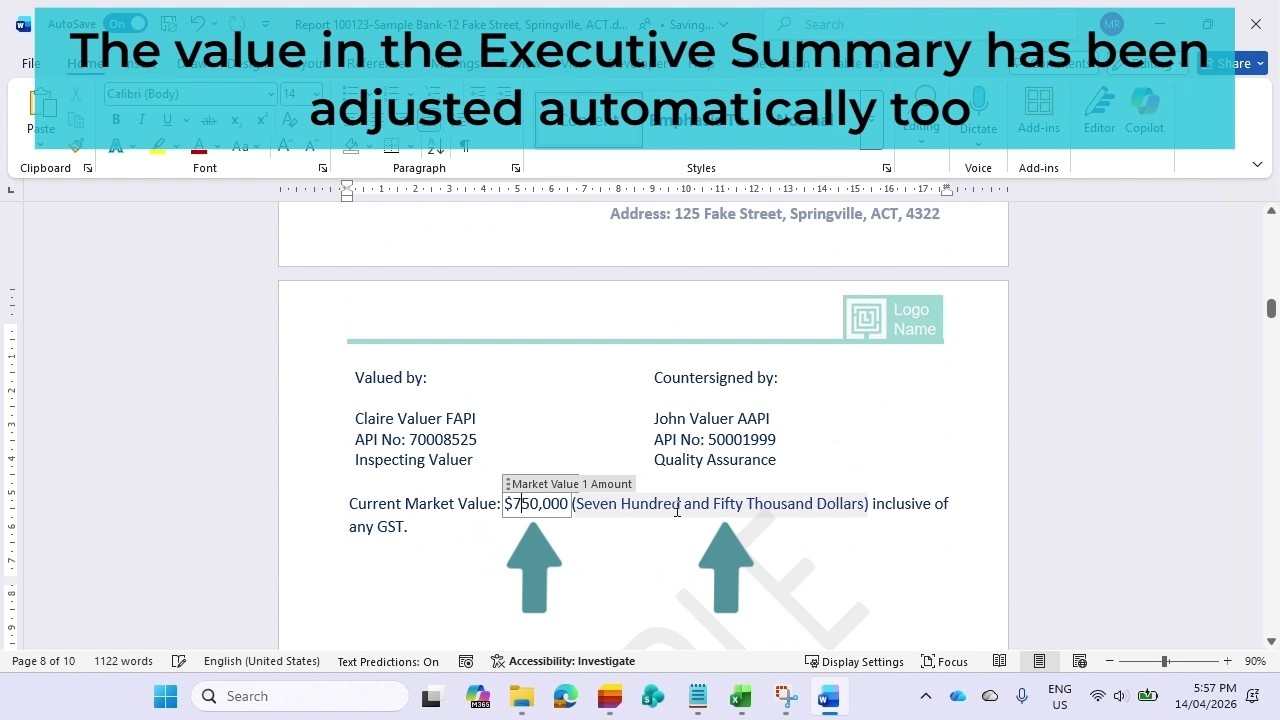
Notice a mistake? Edit once
The correction
propagates through
the entire document
Over 70 standard fields
The document can be edited
You can optionally copy data you entered . . .
. . . into Excel . . .
. . . Even if your Excel columns are different
Slider panel designed for PC viewing.
All information on this site is sample data only.
Many valuation firms still re-enter the same job details into multiple documents . . .
- Copy and paste Word documents from a previous job
- Find and replace text from a previous job
- Work from a blank template with no automation.
As a result they:
- Struggle to keep disclaimers and commentary up to date
- Struggle to rebrand
- Struggle to update outdated templates
- Fix wrong report content at the last minute (hopefully)
- Spend time and energy on tedious work
"Did we update the valuation amount on the Executive Summary and the Valuation Conclusion?
How about in the Valuation Rationale section?"
Use Switched On Reporting
- Enter job details once
- Generate your retainer, valuation report and invoice with job details automatically — in your own templates
- Property valuation reporting, without the tedious re-typing
- Changes to basic fields within each Word document are automatically synced (e.g. Address and Valuation Amount - over 70 fields)
- You stay in control — the system just removes manual repetition and improves turnaround times
- Admin staff (or assigned valuers) enter job details once into a simple job register
- Your retainer agreement, valuation report and tax invoice are generated instantly
- Adapted to your firm’s own Word templates, branding and wording
- Spreadsheets can have automated links to your Valuation Report and/or Retainer Agreement/Letter of Engagement (through third party software vendor(s) that meets your requirements)